
New version 16.25 is on #MailBot site: https://tavel.in/en/download/
The following features have been fixed in the Mail.ru creator and checker:
- creation of aliases
- disabling antispam
- disabling smart folders
Thanks to @e7710t
—
На сайте #MailBot новая версия 16.25: https://tavel.in/download/
В регере и чекере Mail.ru исправлены следующие функции:
- создание псевдонимов
- отключение антиспама
- отключение умной сортировки писем
Благодарность @e7710t
The following features have been fixed in the Mail.ru creator and checker:
- creation of aliases
- disabling antispam
- disabling smart folders
Thanks to @e7710t
—
На сайте #MailBot новая версия 16.25: https://tavel.in/download/
В регере и чекере Mail.ru исправлены следующие функции:
- создание псевдонимов
- отключение антиспама
- отключение умной сортировки писем
Благодарность @e7710t
tavel.net
MailBot • Download
MailBot client cabinet
New version 16.26 is on #MailBot site: https://tavel.in/en/download/
Implemented a FunCAPTCHA solution before sending an SMS to a phone number when unlocking Outlook accounts.
The handling of error code 1346 when trying to send an SMS to a phone number when unlocking Outlook accounts has also been fixed.
—
На сайте #MailBot новая версия 16.26: https://tavel.in/download/
Реализовано решение FunCAPTCHA перед отправкой SMS на номер телефона при разблокировке аккаунтов Outlook.
Также исправлена обработка ошибки с кодом 1346 при попытке отправить SMS на номер телефона при разблокировке аккаунтов Outlook.
Implemented a FunCAPTCHA solution before sending an SMS to a phone number when unlocking Outlook accounts.
The handling of error code 1346 when trying to send an SMS to a phone number when unlocking Outlook accounts has also been fixed.
—
На сайте #MailBot новая версия 16.26: https://tavel.in/download/
Реализовано решение FunCAPTCHA перед отправкой SMS на номер телефона при разблокировке аккаунтов Outlook.
Также исправлена обработка ошибки с кодом 1346 при попытке отправить SMS на номер телефона при разблокировке аккаунтов Outlook.
tavel.net
MailBot • Download
MailBot client cabinet
New version 16.27 is on #MailBot site: https://tavel.in/en/download/
Support for the www.sms168api.com service has been added to the api-sms-pro API.
Thanks to @star69531
—
На сайте #MailBot новая версия 16.27: https://tavel.in/download/
В API api-sms-pro добавлена поддержка сервиса www.sms168api.com.
Благодарность @star69531
Support for the www.sms168api.com service has been added to the api-sms-pro API.
Thanks to @star69531
—
На сайте #MailBot новая версия 16.27: https://tavel.in/download/
В API api-sms-pro добавлена поддержка сервиса www.sms168api.com.
Благодарность @star69531
tavel.net
MailBot • Download
MailBot client cabinet
New version 16.28 is on #MailBot site: https://tavel.in/en/download/
Outlook has disabled creation of accounts on 12 national domains:
These domains have been removed from the list of available domains.
However, two new national domains available for account creation have been added:
Thanks to @den1983
—
На сайте #MailBot новая версия 16.28: https://tavel.in/download/
Outlook запретил регистрацию аккаунтов на 12 национальных доменах:
Эти домены удалены из списка доступных для регистрации.
Однако, добавилось два новых национальных домена, доступных для регистрации:
Благодарность @den1983
Outlook has disabled creation of accounts on 12 national domains:
outlook.at
outlook.cl
outlook.co.id
outlook.co.th
outlook.cz
outlook.es
outlook.fr
outlook.kr
outlook.ph
outlook.sa
outlook.sg
outlook.sk
These domains have been removed from the list of available domains.
However, two new national domains available for account creation have been added:
outlook.co.nz
outlook.com.pe
Thanks to @den1983
—
На сайте #MailBot новая версия 16.28: https://tavel.in/download/
Outlook запретил регистрацию аккаунтов на 12 национальных доменах:
outlook.at
outlook.cl
outlook.co.id
outlook.co.th
outlook.cz
outlook.es
outlook.fr
outlook.kr
outlook.ph
outlook.sa
outlook.sg
outlook.sk
Эти домены удалены из списка доступных для регистрации.
Однако, добавилось два новых национальных домена, доступных для регистрации:
outlook.co.nz
outlook.com.pe
Благодарность @den1983
tavel.net
MailBot • Download
MailBot client cabinet
New version 16.29 is on #MailBot site: https://tavel.in/en/download/
Outlook now automatically enables POP3 and IMAP after creating a mailbox, so "POP3" and "IMAP" checkboxes on the "Email features" tab in MailBot are now enabled and locked from being changed when
Thanks to @STM_Solution
—
На сайте #MailBot новая версия 16.29: https://tavel.in/download/
Outlook теперь автоматически активирует POP3 и IMAP после создания почтового ящика, поэтому флажки "POP3" и "IMAP" на вкладке "Функции email" в MailBot теперь включены и заблокированы от изменения при выбранном
Также исправлена ошибка
Благодарность @STM_Solution
Outlook now automatically enables POP3 and IMAP after creating a mailbox, so "POP3" and "IMAP" checkboxes on the "Email features" tab in MailBot are now enabled and locked from being changed when
Outlook.com is selected on the "Provider" tab.EAccountInvalidFormat error has also been fixed when Outlook checker works with accounts like:+573144291269:eC6Cp9w68t
Thanks to @STM_Solution
—
На сайте #MailBot новая версия 16.29: https://tavel.in/download/
Outlook теперь автоматически активирует POP3 и IMAP после создания почтового ящика, поэтому флажки "POP3" и "IMAP" на вкладке "Функции email" в MailBot теперь включены и заблокированы от изменения при выбранном
Outlook.com на вкладке "Сервис".Также исправлена ошибка
EAccountInvalidFormat при работе чекера Outlook с аккаунтами вида:+573144291269:eC6Cp9w68t
Благодарность @STM_Solution
tavel.net
MailBot • Download
MailBot client cabinet
С аккаунтами разобрались. Что делать дальше?🤔
Дальше нужно зарабатывать на email-рассылках. Сейчас самый большой заработок даёт реклама онлайн-казино.
Я рекомендую работать с этой ПП:www.ejex.club
Это надёжная Партнёрская программа, которая платит за email трафик больше, чем другие партнёрки. Дают письма/базы для рассылок и объясняют, как правильно лить трафик с email-рассылок на казино.
Дальше нужно зарабатывать на email-рассылках. Сейчас самый большой заработок даёт реклама онлайн-казино.
Я рекомендую работать с этой ПП:
Это надёжная Партнёрская программа, которая платит за email трафик больше, чем другие партнёрки. Дают письма/базы для рассылок и объясняют, как правильно лить трафик с email-рассылок на казино.
New version 16.30 is on #MailBot site: https://tavel.in/en/download/
Fixed work of the Luminati proxy judge.
—
На сайте #MailBot новая версия 16.30: https://tavel.in/download/
Исправлена работа судьи прокси Luminati.
Fixed work of the Luminati proxy judge.
—
На сайте #MailBot новая версия 16.30: https://tavel.in/download/
Исправлена работа судьи прокси Luminati.
tavel.net
MailBot • Download
MailBot client cabinet
New version 16.31 is on #MailBot site: https://tavel.in/en/download/
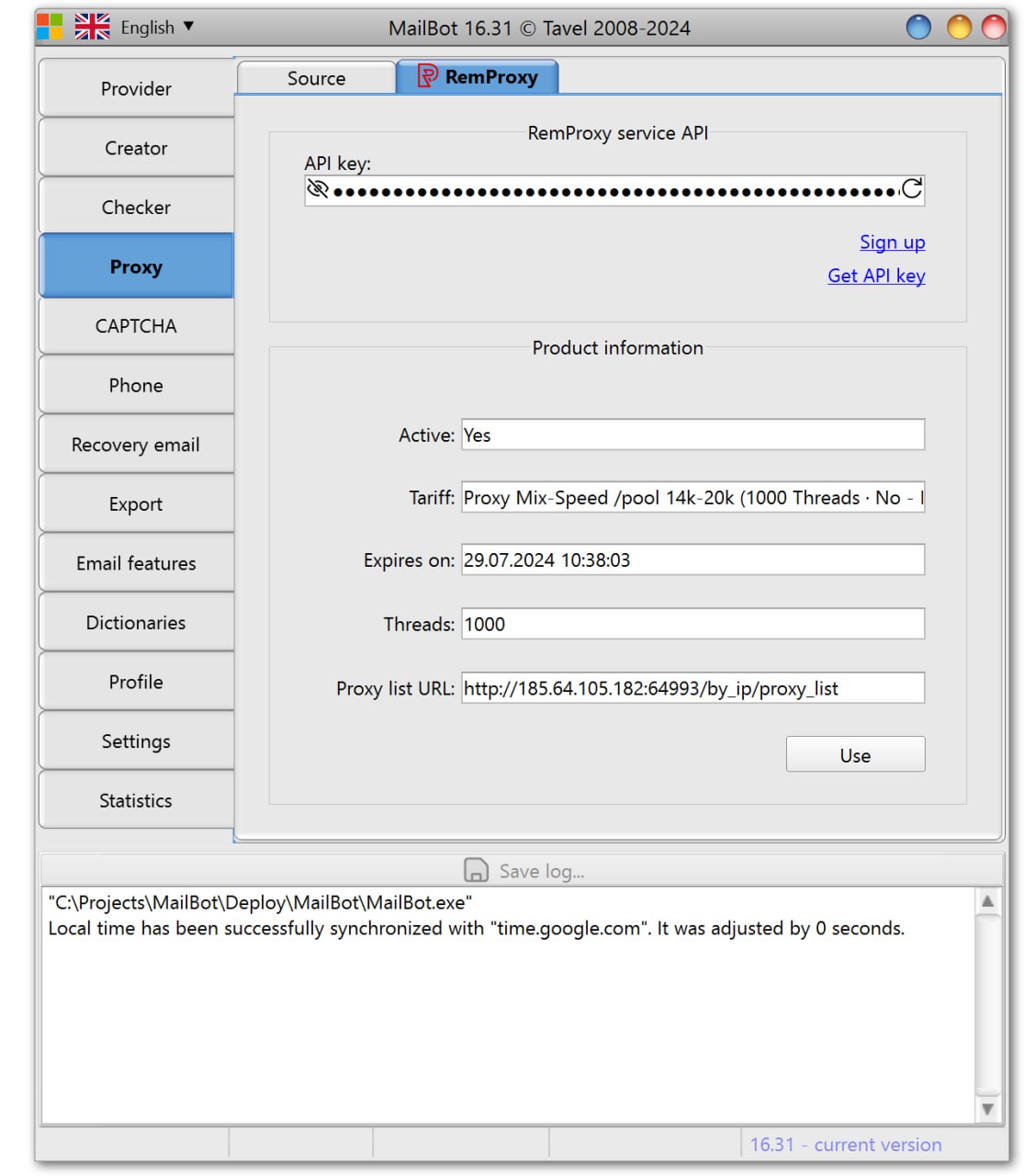
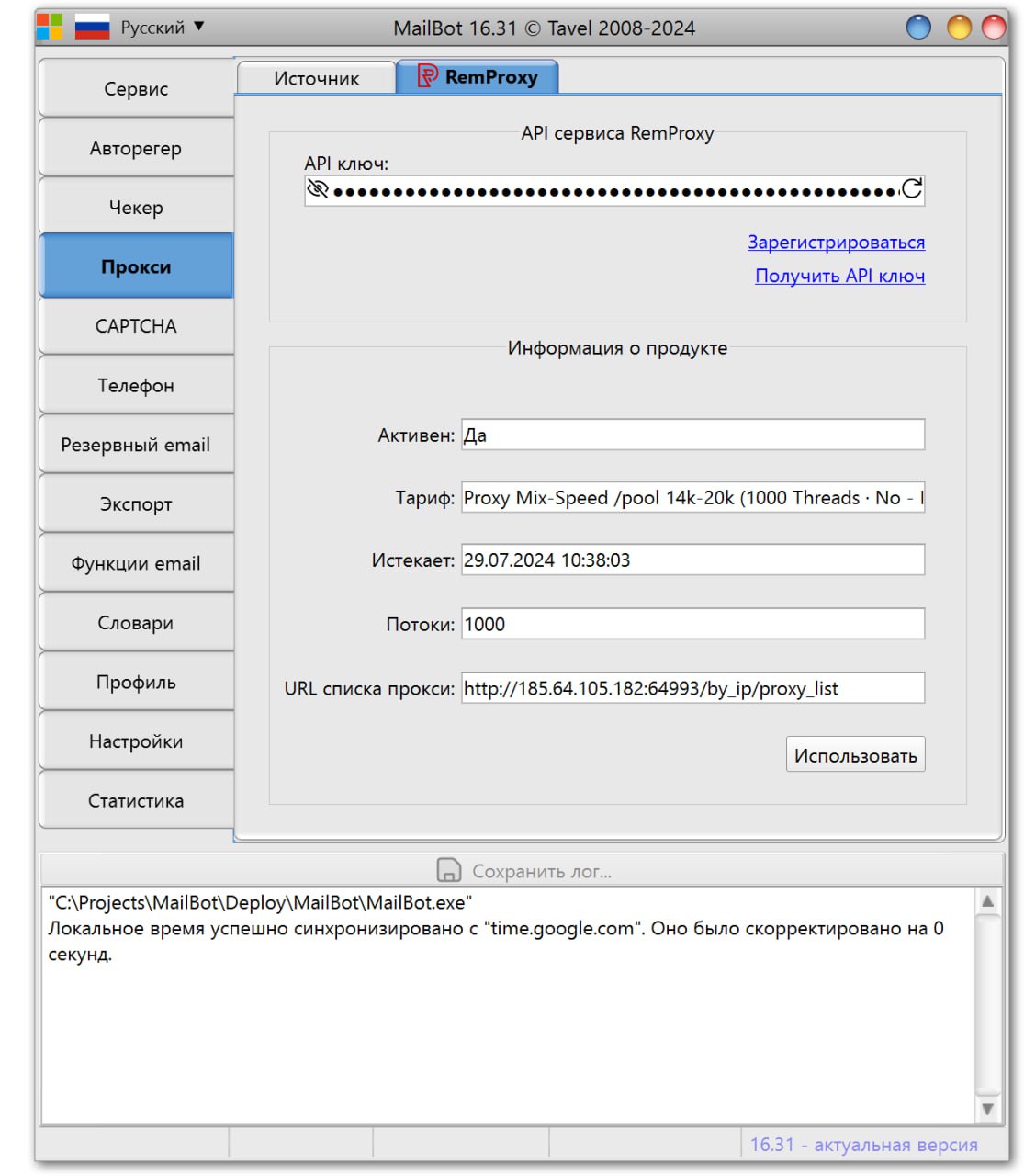
MailBot now has a separate tab for working with the API of the RemProxy proxy service.
The process of purchasing these proxies is not entirely normal, so I made a mini FAQ:
Where can I get an API key?
1. First you need to signup on the olddot.org forum.
2. After logging in to the forum, go to the proxy sales topic: https://olddot.org/store/category/1-magazin-remix-proxy/
3. Select the button of the appropriate proxy package at the bottom, for example "Proxy MIX-Speed".
4. At the bottom of the next page there will again be 2 buttons: a test for 1 hour and a full purchase (for a day or more). Let’s take a full purchase as an example. On the next page, you will need to check "I Agree to Terms" box and select the period for which you are buying a proxy package, for example, for 1 day you'll pay $20, and for a week - $65, i.e. the more days you buy, the greater the discount (you can save up to 80% if you buy for six months at once).
You also need to choose how many threads are maximally allowed to work with the proxy list, the minimum number is 1000, the maximum is 40000, that is, the service is clearly designed to handle very high loads.
"Email ports" is an important option. MailBot does not use SMTP ports, however, if recovery email verification is enabled, then MailBot will work with them via IMAP and for this, ports 993 and 143 must be opened on the proxy. Thus, if you plan to use the recovery email verification option, then you need to select "Emails allowed" option.
After selecting all the options, click the "Add to Cart", "Review & Checkout" and "Checkout" buttons.
Then all you have to do is select a payment method and click the "Place Order And Pay" button.
5. After successful payment, you will see the purchased proxy package in the My Purchases section.
By clicking on the link in this section you will be taken to the package control panel page, where in the "API to manage this purchase" section you can finally click the "+ Add new access key" button, after which the treasured API key will appear in the "API Access Key:" field!
Do proxies support username/password access?
No, access to proxies is only possible from whitelisted IP addresses, but there can be several of them.
Manually: On the control panel page of the purchased proxy package (see p. 5 from the answer to the 1st question).
By API: After clicking on the "Use" button on the "RemProxy" tab, a check will be made to see if the external IP address of the computer on which MailBot is running has been already whitelisted for proxy access and, if not, a question about adding will be displayed. After clicking the "Yes" button, the IP address will be whitelisted automatically.
—
На сайте #MailBot новая версия 16.31: https://tavel.in/download/
В MailBot появилась отдельная вкладка для работы с API прокси-сервиса RemProxy.
Процесс покупки этих прокси не совсем обычный, поэтому я сделал мини FAQ:
Где взять API-ключ?
MailBot now has a separate tab for working with the API of the RemProxy proxy service.
The process of purchasing these proxies is not entirely normal, so I made a mini FAQ:
Where can I get an API key?
1. First you need to signup on the olddot.org forum.
2. After logging in to the forum, go to the proxy sales topic: https://olddot.org/store/category/1-magazin-remix-proxy/
3. Select the button of the appropriate proxy package at the bottom, for example "Proxy MIX-Speed".
4. At the bottom of the next page there will again be 2 buttons: a test for 1 hour and a full purchase (for a day or more). Let’s take a full purchase as an example. On the next page, you will need to check "I Agree to Terms" box and select the period for which you are buying a proxy package, for example, for 1 day you'll pay $20, and for a week - $65, i.e. the more days you buy, the greater the discount (you can save up to 80% if you buy for six months at once).
You also need to choose how many threads are maximally allowed to work with the proxy list, the minimum number is 1000, the maximum is 40000, that is, the service is clearly designed to handle very high loads.
"Email ports" is an important option. MailBot does not use SMTP ports, however, if recovery email verification is enabled, then MailBot will work with them via IMAP and for this, ports 993 and 143 must be opened on the proxy. Thus, if you plan to use the recovery email verification option, then you need to select "Emails allowed" option.
After selecting all the options, click the "Add to Cart", "Review & Checkout" and "Checkout" buttons.
Then all you have to do is select a payment method and click the "Place Order And Pay" button.
5. After successful payment, you will see the purchased proxy package in the My Purchases section.
By clicking on the link in this section you will be taken to the package control panel page, where in the "API to manage this purchase" section you can finally click the "+ Add new access key" button, after which the treasured API key will appear in the "API Access Key:" field!
Do proxies support username/password access?
No, access to proxies is only possible from whitelisted IP addresses, but there can be several of them.
How to whitelist an IP address for access?
Manually: On the control panel page of the purchased proxy package (see p. 5 from the answer to the 1st question).
By API: After clicking on the "Use" button on the "RemProxy" tab, a check will be made to see if the external IP address of the computer on which MailBot is running has been already whitelisted for proxy access and, if not, a question about adding will be displayed. After clicking the "Yes" button, the IP address will be whitelisted automatically.
—
На сайте #MailBot новая версия 16.31: https://tavel.in/download/
В MailBot появилась отдельная вкладка для работы с API прокси-сервиса RemProxy.
Процесс покупки этих прокси не совсем обычный, поэтому я сделал мини FAQ:
Где взять API-ключ?
1. Сначала нужно зарегистрироваться на форуме olddot.org.
2. После логина на форуме идём в топик продажи прокси: https://olddot.org/store/category/1-magazin-remix-proxy/
3. Выбираем кнопку подходящего пакета прокси внизу, например "Прокси MIX-Speed".
4. Внизу следующей страницы будет снова две кнопки: тест на 1 час и полноценная покупка (на 1 день или больше). Выберем для примера полноценную покупку. На следующей странице нужно будет обязательно отметить флажок "I Agree to Terms" и выбрать период, на который покупаем прокси, например за 1 день мы заплатим 20 $, а за неделю - 65 $, т.е. чем больше дней покупаем, тем больше скидка (до 80% можно сэкономить, если купить сразу на полгода).
Тут же нужно выбрать сколько потоков максимально разрешено для работы со списком прокси, минимальное количество - 1000, максимальное - 40000, то есть сервис явно спроектирован держать очень высокие нагрузки.
"Почтовые порты" - это важная опция. MailBot не использует порты SMTP, однако, если включена верификация резервных email, то MailBot будет работать с ними по IMAP и для этого на прокси должны быть открыты порты 993 и 143. Таким образом, если вы планируете пользоваться опцией верификации резервных email, значит нужно выбирать вариант "Почта разрешена", если не планируете, то можно оставить как есть.
После выбора всех опций нажимаем кнопки "Добавить в корзину", "Проверить и оформить заказ" и "Оформление заказа".
Дальше останется только выбрать способ оплаты и нажать кнопку "Оформить заказ и оплатить".
5. После успешной оплаты вы увидите купленный пакет прокси в разделе Мои покупки.
Нажав на ссылку в этом разделе вы попадёте на страницу панели управления пакетом, где в разделе "API управления", наконец, можно будет нажать кнопку "+ Добавить новый ключ доступа", после чего в поле "API Access Key:" появится заветный API-ключ!
Прокси поддерживают доступ по логину/паролю?
Нет, доступ к прокси возможен только с привязанных IP-адресов, но их может быть несколько.
Как привязать свой IP-адрес для доступа?
Вручную: На странице панели управления купленным пакетом прокси (см. п. 5 из ответа на 1-й вопрос).
По API: После нажатия на кнопку "Использовать" на вкладке "RemProxy" будет выполнена проверка, добавлен ли внешний IP-адрес компьютера, на котором запущен MailBot, в белый список для доступа к прокси и, если нет, выведен вопрос о добавлении. После нажатия на кнопку "Да", IP-адрес будет добавлен в белый список автоматически.
2. После логина на форуме идём в топик продажи прокси: https://olddot.org/store/category/1-magazin-remix-proxy/
3. Выбираем кнопку подходящего пакета прокси внизу, например "Прокси MIX-Speed".
4. Внизу следующей страницы будет снова две кнопки: тест на 1 час и полноценная покупка (на 1 день или больше). Выберем для примера полноценную покупку. На следующей странице нужно будет обязательно отметить флажок "I Agree to Terms" и выбрать период, на который покупаем прокси, например за 1 день мы заплатим 20 $, а за неделю - 65 $, т.е. чем больше дней покупаем, тем больше скидка (до 80% можно сэкономить, если купить сразу на полгода).
Тут же нужно выбрать сколько потоков максимально разрешено для работы со списком прокси, минимальное количество - 1000, максимальное - 40000, то есть сервис явно спроектирован держать очень высокие нагрузки.
"Почтовые порты" - это важная опция. MailBot не использует порты SMTP, однако, если включена верификация резервных email, то MailBot будет работать с ними по IMAP и для этого на прокси должны быть открыты порты 993 и 143. Таким образом, если вы планируете пользоваться опцией верификации резервных email, значит нужно выбирать вариант "Почта разрешена", если не планируете, то можно оставить как есть.
После выбора всех опций нажимаем кнопки "Добавить в корзину", "Проверить и оформить заказ" и "Оформление заказа".
Дальше останется только выбрать способ оплаты и нажать кнопку "Оформить заказ и оплатить".
5. После успешной оплаты вы увидите купленный пакет прокси в разделе Мои покупки.
Нажав на ссылку в этом разделе вы попадёте на страницу панели управления пакетом, где в разделе "API управления", наконец, можно будет нажать кнопку "+ Добавить новый ключ доступа", после чего в поле "API Access Key:" появится заветный API-ключ!
Прокси поддерживают доступ по логину/паролю?
Нет, доступ к прокси возможен только с привязанных IP-адресов, но их может быть несколько.
Как привязать свой IP-адрес для доступа?
Вручную: На странице панели управления купленным пакетом прокси (см. п. 5 из ответа на 1-й вопрос).
По API: После нажатия на кнопку "Использовать" на вкладке "RemProxy" будет выполнена проверка, добавлен ли внешний IP-адрес компьютера, на котором запущен MailBot, в белый список для доступа к прокси и, если нет, выведен вопрос о добавлении. После нажатия на кнопку "Да", IP-адрес будет добавлен в белый список автоматически.
New version 16.32 is on #MailBot site: https://tavel.in/en/download/
Fixed
—
На сайте #MailBot новая версия 16.32: https://tavel.in/download/
Исправлена ошибка
Fixed
EFormURLNotFound error in Yahoo and AOL.com creators.—
На сайте #MailBot новая версия 16.32: https://tavel.in/download/
Исправлена ошибка
EFormURLNotFound в регерах Yahoo и AOL.com.tavel.net
MailBot • Download
MailBot client cabinet
New version 16.33 is on #MailBot site: https://tavel.in/en/download/
Fixed a common Outlook checker/unlocker error "
—
На сайте #MailBot новая версия 16.33: https://tavel.in/download/
Исправлена частая ошибка чекера/анлокера Outlook "
Fixed a common Outlook checker/unlocker error "
Unable to check account..."—
На сайте #MailBot новая версия 16.33: https://tavel.in/download/
Исправлена частая ошибка чекера/анлокера Outlook "
Не удалось проверить аккаунт..."tavel.net
MailBot • Download
MailBot client cabinet
RockCaptcha has dropped support for FunCAPTCHA. This is their final decision.
CapSolver has also disabled FunCAPTCHA for Outlook. Temporarily for now.
EzCaptcha still remains in service.
And new version 16.34 is on #MailBot site: https://tavel.in/en/download/
The CapSolver API has been fixed to work correctly with CapBypass. This service solves FunCAPTCHA for Outlook for $1 per 1000 solutions.
—
RockCaptcha отказались от поддержки FunCAPTCHA. Это их окончательное решение.
CapSolver также отключил FunCAPTCHA для Outlook. Пока временно.
По-прежнему в строю EzCaptcha.
А на сайте #MailBot новая версия 16.34: https://tavel.in/download/
Исправлен API CapSolver для корректной работы с CapBypass. Этот сервис решает FunCAPTCHA для Outlook по $1 за 1000 решений.
CapSolver has also disabled FunCAPTCHA for Outlook. Temporarily for now.
EzCaptcha still remains in service.
And new version 16.34 is on #MailBot site: https://tavel.in/en/download/
The CapSolver API has been fixed to work correctly with CapBypass. This service solves FunCAPTCHA for Outlook for $1 per 1000 solutions.
—
RockCaptcha отказались от поддержки FunCAPTCHA. Это их окончательное решение.
CapSolver также отключил FunCAPTCHA для Outlook. Пока временно.
По-прежнему в строю EzCaptcha.
А на сайте #MailBot новая версия 16.34: https://tavel.in/download/
Исправлен API CapSolver для корректной работы с CapBypass. Этот сервис решает FunCAPTCHA для Outlook по $1 за 1000 решений.
New version 16.35 is on #MailBot site: https://tavel.in/en/download/
The tab for working with ASOCKS API has been returned to MailBot.
—
На сайте #MailBot новая версия 16.35: https://tavel.in/download/
В MailBot возвращена вкладка для работы с ASOCKS API.
The tab for working with ASOCKS API has been returned to MailBot.
—
На сайте #MailBot новая версия 16.35: https://tavel.in/download/
В MailBot возвращена вкладка для работы с ASOCKS API.
Since FunCAPTCHA has taken the trend of updating 2-3 times a day, EzCaptcha made a separate method in their API to check if their solution is "working".
If the solution is currently working, the API responds with
To make this request to the API, you need a ClientKey and some technical skills, so I decided to use the full power of AI and help my users to check the status for Outlook's FunCAPTCHA in one click. GPT-4o coded a Telegram bot to check the current support status of the Outlook's FunCAPTCHA solution.
After the
What about security?
1. The bot is completely open source, anyone can view its Node.js source code, make a copy of it, etc.
2. The keys are stored in the SQLite DB, the file of which is stored in a private directory.
3.
4. The bot was created entirely by GPT-4o in 2 hours and does not involve any monetization, so your keys will not be used by me anywhere or in any way.
5. If paranoia does not let go, then no one is stopping you from changing your key in the EzCaptcha control panel after using the bot.
https://t.me/ezstatus_bot
—
Поскольку FunCAPTCHA взяла моду обновляться по 2-3 раза на дню, EzCaptcha сделали отдельный метод в API для проверки "рабочести" их решения.
Если решение в данный момент работает, API отвечает
Чтобы выполнить этот запрос к API, нужен API-ключ и какие-то технические навыки, поэтому я решил использовать всю мощь AI и помочь своим пользователям в один клик проверять статус для FunCAPTCHA Outlook. GPT-4o написал Telegram-бота для проверки текущего статуса поддержки решения FunCAPTCHA Outlook.
После команды
Что по безопасности?
1. Бот полностью open source, каждый может посмотреть его исходники на Node.js, сделать себе его копию и т.п.
2. Ключи хранятся в БД SQLite, файл которой хранится в приватной директории.
3. Команда
4. Бот написан полностью GPT-4o за 2 часа и никакой монетизации не предполагает, поэтому ваши ключи нигде и никаким образом не будут использованы мной.
5. Если паранойя не отпускает, то никто не мешает вам сменить ваш ключ в панели управления EzCaptcha после использования бота.
https://t.me/ezstatus_bot
If the solution is currently working, the API responds with
{"status":"NORMAL"}, and if the solution is in the process of being fixed, then you'll see {"status":"UPDATING"}To make this request to the API, you need a ClientKey and some technical skills, so I decided to use the full power of AI and help my users to check the status for Outlook's FunCAPTCHA in one click. GPT-4o coded a Telegram bot to check the current support status of the Outlook's FunCAPTCHA solution.
After the
/start command, the bot will ask for your ClientKey, make a request to the API with this key and display the response. The bot will save your key in the DB and next time you will only need to give the /start command. Use the /reset command if you need to remove your key from the DB or to make a request with a different key.What about security?
1. The bot is completely open source, anyone can view its Node.js source code, make a copy of it, etc.
2. The keys are stored in the SQLite DB, the file of which is stored in a private directory.
3.
/reset command completely removes your key from the DB, no other logs are kept and nothing else is saved in the DB.4. The bot was created entirely by GPT-4o in 2 hours and does not involve any monetization, so your keys will not be used by me anywhere or in any way.
5. If paranoia does not let go, then no one is stopping you from changing your key in the EzCaptcha control panel after using the bot.
https://t.me/ezstatus_bot
—
Поскольку FunCAPTCHA взяла моду обновляться по 2-3 раза на дню, EzCaptcha сделали отдельный метод в API для проверки "рабочести" их решения.
Если решение в данный момент работает, API отвечает
{"status":"NORMAL"}, а если решение находится в процессе починки, то {"status":"UPDATING"}Чтобы выполнить этот запрос к API, нужен API-ключ и какие-то технические навыки, поэтому я решил использовать всю мощь AI и помочь своим пользователям в один клик проверять статус для FunCAPTCHA Outlook. GPT-4o написал Telegram-бота для проверки текущего статуса поддержки решения FunCAPTCHA Outlook.
После команды
/start бот запросит ваш ClientKey, сделает запрос к API с этим ключом и отобразит ответ. Бот сохранит ваш ключ в БД и в следующий раз достаточно будет только дать команду /start. Используйте команду /reset если нужно удалить свой ключ из БД или выполнить запрос с другим ключом.Что по безопасности?
1. Бот полностью open source, каждый может посмотреть его исходники на Node.js, сделать себе его копию и т.п.
2. Ключи хранятся в БД SQLite, файл которой хранится в приватной директории.
3. Команда
/reset полностью удаляет ваш ключ из БД, никакие другие логи не ведутся и ничего больше в БД не сохраняется.4. Бот написан полностью GPT-4o за 2 часа и никакой монетизации не предполагает, поэтому ваши ключи нигде и никаким образом не будут использованы мной.
5. Если паранойя не отпускает, то никто не мешает вам сменить ваш ключ в панели управления EzCaptcha после использования бота.
https://t.me/ezstatus_bot
Glitch
Glitch Blog
The official blog for glitch.com
New version 16.36 is on #MailBot site: https://tavel.in/en/download/
Fixed MailBot's work with Hard Captcha API.
Attention! The update does not mean that this service solves Outlook FunCAPTCHA right now. The API has just been fixed according to the documentation.
—
На сайте #MailBot новая версия 16.36: https://tavel.in/download/
В MailBot исправлена работа с API Hard Captcha.
Внимание! Апдейт не означает, что этот сервис прямо сейчас решает FunCAPTCHA Outlook. Просто исправлен API в соответствии с документацией.
Fixed MailBot's work with Hard Captcha API.
Attention! The update does not mean that this service solves Outlook FunCAPTCHA right now. The API has just been fixed according to the documentation.
—
На сайте #MailBot новая версия 16.36: https://tavel.in/download/
В MailBot исправлена работа с API Hard Captcha.
Внимание! Апдейт не означает, что этот сервис прямо сейчас решает FunCAPTCHA Outlook. Просто исправлен API в соответствии с документацией.
tavel.net
MailBot • Download
MailBot client cabinet
Project MailBot started accepting payments in Toncoin (TON).
—
Проект MailBot начал принимать к оплате Toncoin (TON).
—
Проект MailBot начал принимать к оплате Toncoin (TON).
tavel.net
MailBot by Tavel — Email Accounts Creator, Checker, Unlocker
MailBot by Tavel is a high-performance Windows application that automatically creates, checks (for valid or existence) or unlocks email accounts in bulk. View MailBot pricing @ Supported email providers Outlook.com (+ hotmail.com + 32 national Outlook …
New version 16.37 is on #MailBot site: https://tavel.in/en/download/
MailBot's random username generator now sometimes uses birth year and separators.
—
На сайте #MailBot новая версия 16.37: https://tavel.in/download/
Генератор случайных логинов в MailBot теперь иногда использует год рождения и разделители.
MailBot's random username generator now sometimes uses birth year and separators.
—
На сайте #MailBot новая версия 16.37: https://tavel.in/download/
Генератор случайных логинов в MailBot теперь иногда использует год рождения и разделители.
tavel.net
MailBot • Download
MailBot client cabinet
New version 16.38 is on #MailBot site: https://tavel.in/en/download/
Fixed non-arrival of SMS in UKR.net creator.
—
На сайте #MailBot новая версия 16.38: https://tavel.in/download/
Исправлен неприход SMS в регере UKR.net.
Fixed non-arrival of SMS in UKR.net creator.
—
На сайте #MailBot новая версия 16.38: https://tavel.in/download/
Исправлен неприход SMS в регере UKR.net.
tavel.net
MailBot • Download
MailBot client cabinet
New version 16.39 is on #MailBot site: https://tavel.in/en/download/
Mail.com and GMX.com creators now take into account the profile country selected by the user on the "Profile" tab in MailBot.
—
На сайте #MailBot новая версия 16.39: https://tavel.in/download/
Регеры Mail.com и GMX.com теперь учитывают страну профиля, выбранную пользователем на вкладке "Профиль" в MailBot.
Mail.com and GMX.com creators now take into account the profile country selected by the user on the "Profile" tab in MailBot.
—
На сайте #MailBot новая версия 16.39: https://tavel.in/download/
Регеры Mail.com и GMX.com теперь учитывают страну профиля, выбранную пользователем на вкладке "Профиль" в MailBot.
tavel.net
MailBot • Download
MailBot client cabinet
New version 16.40 is on #MailBot site: https://tavel.in/en/download/
Fixed saving phone number together with Outlook account data after successful unlocking.
—
На сайте #MailBot новая версия 16.40: https://tavel.in/download/
Исправлено сохранение номера телефона вместе с данными аккаунта Outlook после его успешной разблокировки.
Fixed saving phone number together with Outlook account data after successful unlocking.
—
На сайте #MailBot новая версия 16.40: https://tavel.in/download/
Исправлено сохранение номера телефона вместе с данными аккаунта Outlook после его успешной разблокировки.
tavel.net
MailBot • Download
MailBot client cabinet