
#TelegramX
- Apply multiple text styles at the same time to messages and captions (bold, italic, etc)
- New text styles: underline and strikethrough
- Nested markdown input support: __bold italic__
- Added Settings – Notifications – Badge Counter – Include Archived Chats
- Added Settings – Interface – Edit Markdown to be able to edit all styles using the old-school way
- Links with Instant View highlighting while viewing them
- Supported <mark> tag in Instant View
- Added new colours
Bugfixes
- Android 10: Incorrectly rotated images in the attachment menu
- "Read all chats" does not read marked as unread chats
- Nested styling in Instant Views does not work properly anymore
#TelegramX
- Fixed crash when trying to send square brackets at the end of the message
0.22.5.1280 beta- Apply multiple text styles at the same time to messages and captions (bold, italic, etc)
- New text styles: underline and strikethrough
- Nested markdown input support: __bold italic__
- Added Settings – Notifications – Badge Counter – Include Archived Chats
- Added Settings – Interface – Edit Markdown to be able to edit all styles using the old-school way
- Links with Instant View highlighting while viewing them
- Supported <mark> tag in Instant View
- Added new colours
Bugfixes
- Android 10: Incorrectly rotated images in the attachment menu
- "Read all chats" does not read marked as unread chats
- Nested styling in Instant Views does not work properly anymore
#TelegramX
0.22.5.1281 beta- Fixed crash when trying to send square brackets at the end of the message
telegram-beta 🔊 pinned «#Telegram How to create local groups in Telegram for Android | #TelegramTips Not a new feature, but local groups in Telegram are certainly not as widely used as they deserve to be. https://www.testingcatalog.com/report/amp/telegramtips-how-to-create-local…»
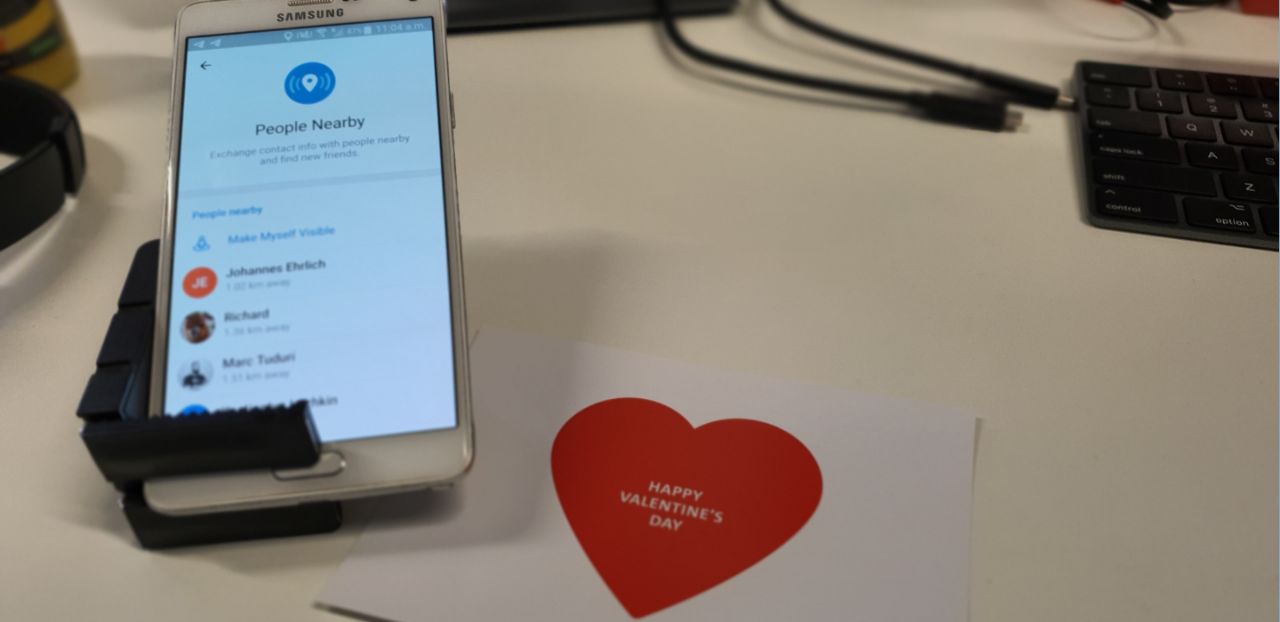
- Improved "Nearby" feature. Now you can make yourself visible to everyone around.
- Improved "User profile" view. Now you can access shared media files from the profile page. Photos can be browsed by tapping on the right and left corner.
- Tap on the user avatar now opens profile view with expanded profile picture. Tap on the contact name opens it in a minimised state.
- Tap on the user avatar now opens profile view with expanded profile picture. Tap on the contact name opens it in a minimised state.
@Telegram 5.15.0 was promoted to stable. New Profiles, Fast Media Viewer and People Nearby 2.0
https://telegram.org/blog/new-profiles-people-nearby
https://telegram.org/blog/new-profiles-people-nearby
Telegram
New Profiles, Fast Media Viewer and People Nearby 2.0
Hundreds of millions rely on Telegram to share precious moments with their loved ones. Today we're making it easier to relive shared memories with redesigned profiles, instant access to shared media, and new ways to thumb through pictures and videos.
#Telegram 5.15 rolling out with a profile section redesign, People Nearby 2.0, and more.
With each and every release, Telegram is shaping up to become the ultimate messaging and social media platform, news source, cloud storage service, and more - all combined. The best thing about it, maybe, is that it is completely free.
https://www.testingcatalog.com/report/amp/telegram-5-15-rolling-out-with-a-profile-section-redesign-people-nearby-2-0-and-more-new-beta-link-available-as-well
With each and every release, Telegram is shaping up to become the ultimate messaging and social media platform, news source, cloud storage service, and more - all combined. The best thing about it, maybe, is that it is completely free.
https://www.testingcatalog.com/report/amp/telegram-5-15-rolling-out-with-a-profile-section-redesign-people-nearby-2-0-and-more-new-beta-link-available-as-well
#PlusMessenger updated.
New in version 5.15.0.0:
New Profiles, Fast Media Viewer and People Nearby 2.0
• Access shared media directly from the redesigned profile pages.
• Pull down to enlarge profile pictures.
• Flip through photos by tapping on their left or right edge.
• Tap on your chat partner's profile picture to immediately expand it.
• Make your profile visible to others in your area from 'Contacts' > 'Add People Nearby' and make new friends.
@plusmsgr
New in version 5.15.0.0:
New Profiles, Fast Media Viewer and People Nearby 2.0
• Access shared media directly from the redesigned profile pages.
• Pull down to enlarge profile pictures.
• Flip through photos by tapping on their left or right edge.
• Tap on your chat partner's profile picture to immediately expand it.
• Make your profile visible to others in your area from 'Contacts' > 'Add People Nearby' and make new friends.
@plusmsgr
#TelegramX
Changelog for
- Gray color for custom title field when it is read-only
- Admin's custom title updates in Recent Actions
- Loop Animated Stickers setting
- Animated emoji & toggle to turn them off
- Vibrations for some animated emoji
- Bank card number highlighting & click handling in new messages (will not work for messages received before an update)
- Animated emoji tone support (thumbs up, probably etc)
- Moved pin/unpin from Chat Preview to bulk menu
- Select multiple chats for bulk actions
- Bulk chat actions: clear from cache, block/unblock, delete, clear history, mark as read/unread, report
- Detailed warning for bulk delete
- bugfixes
Changelog for
0.22.5.1284-1290 beta- Gray color for custom title field when it is read-only
- Admin's custom title updates in Recent Actions
- Loop Animated Stickers setting
- Animated emoji & toggle to turn them off
- Vibrations for some animated emoji
- Bank card number highlighting & click handling in new messages (will not work for messages received before an update)
- Animated emoji tone support (thumbs up, probably etc)
- Moved pin/unpin from Chat Preview to bulk menu
- Select multiple chats for bulk actions
- Bulk chat actions: clear from cache, block/unblock, delete, clear history, mark as read/unread, report
- Detailed warning for bulk delete
- bugfixes