
Forwarded from Telegram Geeks
✳️ TELEGRAM | TIPS ✳️
If you don't share your own "Last Seen" status this is what your contacts will see from you:
1⃣ Last seen recently:
Between 1 second and 2-3 days
2⃣ Last seen within a week:
Between 2-3 and 7 days
3⃣ Last seen within a month:
Between 6-7 days and a month
4⃣ Last seen long time ago:
More than a month (this is also always shown to blocked users)
#tips #telegram #lastseen
ℹ️ @geeksChannel
Forwarded from Telegram Beta
💡 How to show hidden settings in Telegram
#Android
Settings » scroll to bottom » tap hold 2x on version number.
#iOS
• Tap 10x simultaneously on Settings icon, or
• Settings » Change Number » tap 7x simultaneously on SIM card icon.
2017-09-04 #tips
#Android
Settings » scroll to bottom » tap hold 2x on version number.
#iOS
• Tap 10x simultaneously on Settings icon, or
• Settings » Change Number » tap 7x simultaneously on SIM card icon.
2017-09-04 #tips
Forwarded from KeralaGram [Official]®
✳️ TELEGRAM TIPS & TRICKS ✳️
Are you tired of Telegram not introduced notification panel and only came with @ badge ?
Are you not able to track your mentions?
Here is the tip:
Search for @ or #m in a group or global search
Group Search:
@ - Shows all replies & Mentions to you in the group
#m - Shows the message where your username mentioned
Global Search:
@ - Shows reply & mentions from all groups
#m - Shows the mentions from all groups
Note :
#tips #tricks
🙏 Pic Credit : @tgbeta
ℹ️ @KeralagramChannel
Are you tired of Telegram not introduced notification panel and only came with @ badge ?
Are you not able to track your mentions?
Here is the tip:
Search for @ or #m in a group or global search
Group Search:
@ - Shows all replies & Mentions to you in the group
#m - Shows the message where your username mentioned
Global Search:
@ - Shows reply & mentions from all groups
#m - Shows the mentions from all groups
Note :
IOS users press space key after @ Working on unofficial clients too#tips #tricks
🙏 Pic Credit : @tgbeta
ℹ️ @KeralagramChannel

Forwarded from Telegram Beta
This media is not supported in your browser
VIEW IN TELEGRAM
Forwarded from KeralaGram [Official]®
✳️ TELEGRAM TIPS & TRICKS ✳️
Are you tired of Telegram not introduced notification panel and only came with @ badge ?
Are you not able to track your mentions?
Here is the tip:
Search for @ or #m in a group or global search
Group Search:
@ - Shows all replies & Mentions to you in the group
#m - Shows the message where your username mentioned
Global Search:
@ - Shows reply & mentions from all groups
#m - Shows the mentions from all groups
Note :
#tips #tricks
🙏 Pic Credit : @tgbeta
ℹ️ @KeralagramChannel
Are you tired of Telegram not introduced notification panel and only came with @ badge ?
Are you not able to track your mentions?
Here is the tip:
Search for @ or #m in a group or global search
Group Search:
@ - Shows all replies & Mentions to you in the group
#m - Shows the message where your username mentioned
Global Search:
@ - Shows reply & mentions from all groups
#m - Shows the mentions from all groups
Note :
IOS users press space key after @ Working on unofficial clients too#tips #tricks
🙏 Pic Credit : @tgbeta
ℹ️ @KeralagramChannel
Forwarded from Telegram Beta
💡 Another method of searching: using single quote '...' and double quote "..." in-chat or global search.
#tips
#tips
Forwarded from Telegram Beta
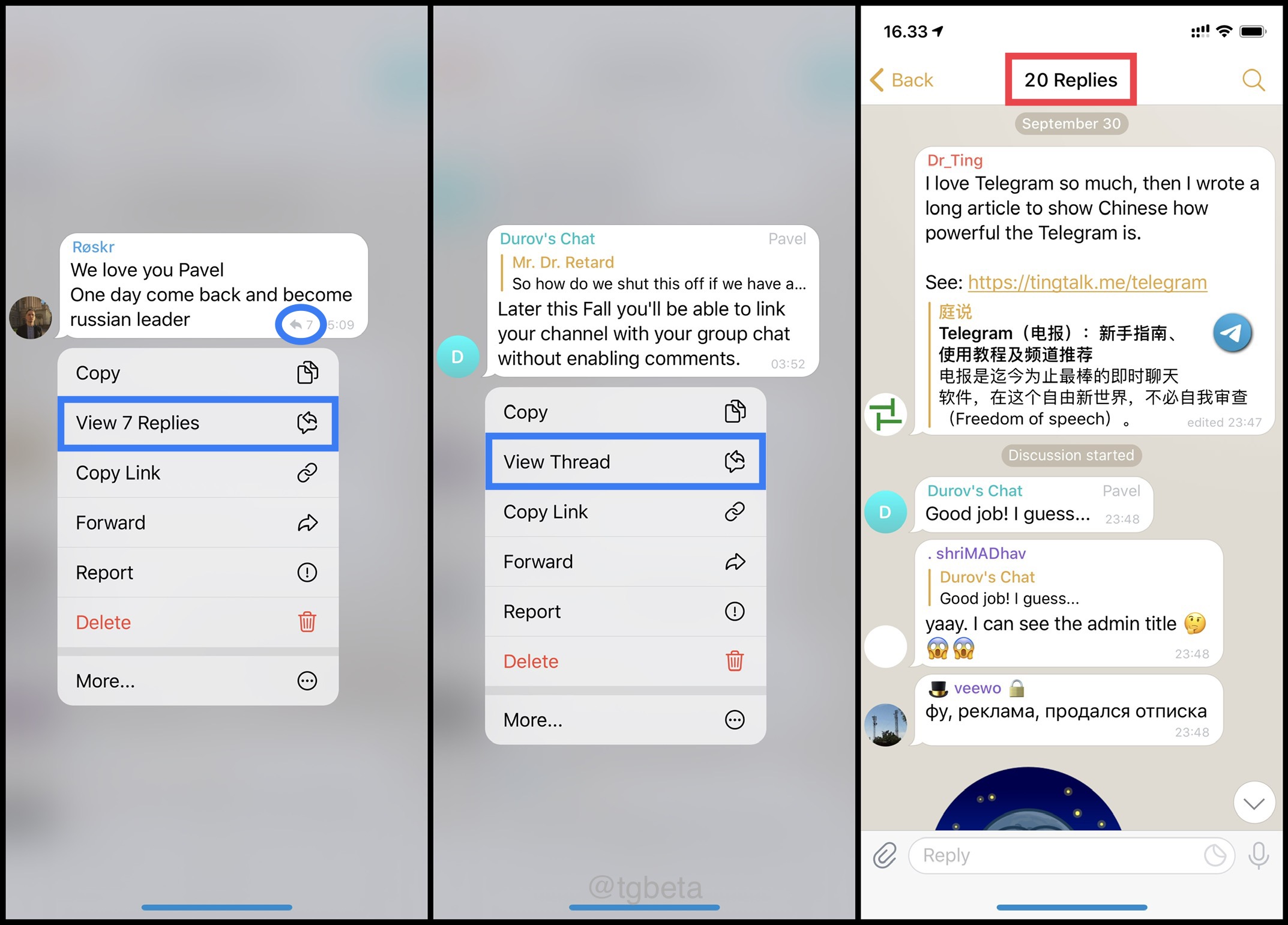
💡 How to enable View Replies/Thread on a Private Group and keep it PRIVATE
(As we know that this feature is available for groups that linked to a channel only)
1️⃣ Create a private channel
2️⃣ Open Channel settings > Edit > Discussion > select your group chat
3️⃣ Done.
Try to reply a message in your group chat, now you should see View Replies/Thread on the message menu.
Examples:
• View Replies from here
• View Thread from here
ℹ️ Notes
• Keep the channel private and empty (it just a dummy channel): no post, no admin/subscriber, and no need to share the channel link.
• Link & unlink channel to a group chat can be done by: owner and admin that has 'Change Channel Info' right.
• Unlink group chat to the channel can be done by: owner and admin that has 'Pin Messages' right.
#tips
Forwarded from Telegram Beta
[Tips] How to embed X and Instagram videos on Telegram
• X (Twitter)
Change
• X (Twitter) on Instant View
Change
• Instagram
Change
Note: some links may not work
More Info: fixupx.com, fixvx.com, ddinstagram.com
@Telegram #tips
• X (Twitter)
Change
x.com ➔ fixupx.com or fixvx.com in your link• X (Twitter) on Instant View
Change
x.com ➔ i.fixupx.com in your linkChange
instagram.com ➔ ddinstagram.com in your linkNote: some links may not work
More Info: fixupx.com, fixvx.com, ddinstagram.com
@Telegram #tips
Forwarded from News and Tips (starterov )
When I first subscribed to a paid channel in 2024, paying for stars to access the channel, I also joined a linked group to read the comments on the posts. After a month, like the average Telegram user, I ran out of 50 stars for monthly access to the channel. However, I stayed in the group that served to access the comments in paid posts. Here I realized that since these chats are linked, I could freely access the channel without paying for stars, and that I could then re-join the same channel.
Now #tips for content creators: Anyone who wants to engage in paid channels should definitely not enable comments, or more precisely, not link discussion groups. Otherwise, subscribers won't pay for access to the channel a second time. Also, don't forget to enable protection against copying/reposts/screenshots (there's no 100% protection). This way, you'll make the channel on par with Patreon pages.
I also created this card so that developers can see this problem.
https://t.me/bugs?startapp=c-50317
Please open Telegram to view this post
VIEW IN TELEGRAM
Telegram
Bugs and Suggestions
Report bugs and suggest new features for Telegram