
Synology BeeStation im Test: Netzwerkfestplatte als Ersatz für Google Drive und iCloud
Content: MediaDie Synology BeeStation ist ein Netzwerkspeicher mit integrierter 4-TB-HDD, der einen schnellen und einfachen Einstieg in die Synchronisation von Dateien, Backups und das zentrale Speichern von Fotos und Videos vom Smartphone bietet. Unkompliziert, ist die BeeStation eine gelungene Ergänzung zu Synologys NAS-Systemen.
Source: https://www.computerbase.de/2024-02/synology-beestation-test-netzwerkfestplatte-backups-cloud/
Author: Frank Hüber
Date: February 15, 2024 at 09:00AM
We are DataHoardingFreaks. A @roadtopetabyte project

rclone mount for docker
Content:
Hello guys.i try to mount some files in a folder with this command :
rclone mount remote:hello remote:bye --allow-other --read-only
and i can see all files without problem
i run jellyfin with docker and wanted to access that folder but its empty ! i can't see anything.
how to share that folder with docker containers using rclone mount ?
thanks.
We are DataHoardingFreaks. A @roadtopetabyte project
Western Digital (Instagram)
Celebrate diverse storytelling with our Afrofuturism edition drive—featuring exclusive content from the hit manga Clock Striker. ✨
Celebrate diverse storytelling with our Afrofuturism edition drive—featuring exclusive content from the hit manga Clock Striker. ✨
Download google photo album in the same order
Content:
Is there any way to download a google photo album in the same order as they appear in the album? I've tried to play with
We are DataHoardingFreaks. A @roadtopetabyte project
Content:
Is there any way to download a google photo album in the same order as they appear in the album? I've tried to play with
sync and copy subcommands but I couldn't find an option for it. The --order-by option doesn't seem to have that.We are DataHoardingFreaks. A @roadtopetabyte project
Western Digital (Instagram)
We looked into our crystal ball and what did we see? You, clicking the link in bio to learn more about Kaleena Gong, Director of Environmental Health and Safety at WD. 🔮
We looked into our crystal ball and what did we see? You, clicking the link in bio to learn more about Kaleena Gong, Director of Environmental Health and Safety at WD. 🔮
Why are the passwords in the config file different from the password used to crypt a remote?
Content:
Set up a crypt remote.
Generate a random password, then a second password for the salt (not sure what it is but I guess it's for more protection).
I've saved both passwords on Bitwarden
But on my config file, password = xxxxx and password2 = xxxxxx are different from the one that I've saved on bitwarden.
Am I missing something? Shouldn't they be the same?
We are DataHoardingFreaks. A @roadtopetabyte project
Content:
Set up a crypt remote.
Generate a random password, then a second password for the salt (not sure what it is but I guess it's for more protection).
I've saved both passwords on Bitwarden
But on my config file, password = xxxxx and password2 = xxxxxx are different from the one that I've saved on bitwarden.
Am I missing something? Shouldn't they be the same?
We are DataHoardingFreaks. A @roadtopetabyte project
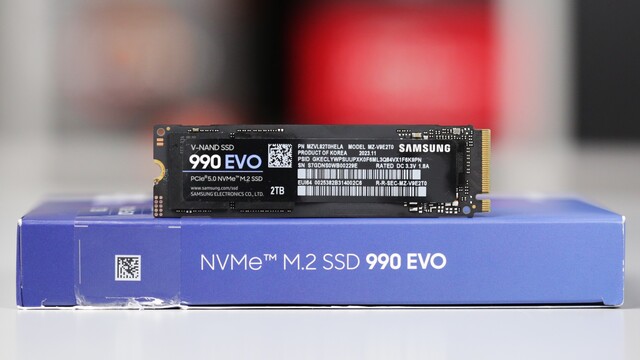
Samsung 990 Evo im Test: Die SSD mit Hybrid-Interface scheitert an hohen Erwartungen
Content: MediaDie SSDs der Serie Samsung Evo waren stets populär mit guter Leistung zu moderaten Preisen. In diese großen Fußstapfen tritt die neue Samsung 990 Evo, die sowohl PCIe 5.0 als auch PCIe 4.0 unterstützt. Füllen mag sie die Spuren der Vorgänger aber nicht so recht.
Source: https://www.computerbase.de/2024-02/samsung-990-evo-ssd-pcie-5-4-test/
Author: Michael Günsch
Date: February 19, 2024 at 12:00PM
We are DataHoardingFreaks. A @roadtopetabyte project
Check vs Sync in finding differences
Content:
I am trying to use rclone to sync a local external ssd attached to my MacBook with my NAS over SMB. I have currently been using Freefilesync to keep the NAS folder mirrored. I am having issues understanding if my folders are properly mirrored or not.
When I run:
-> No differences are found.
When I run:
-> It is saying that 70 files would have been synced (out of about 750).
I don't simply want to overwrite them incase there actually are differences.
What am I missing?
We are DataHoardingFreaks. A @roadtopetabyte project
Content:
I am trying to use rclone to sync a local external ssd attached to my MacBook with my NAS over SMB. I have currently been using Freefilesync to keep the NAS folder mirrored. I am having issues understanding if my folders are properly mirrored or not.
When I run:
rclone check --download
-> No differences are found.
When I run:
rclone sync --dry-run -progress
-> It is saying that 70 files would have been synced (out of about 750).
I don't simply want to overwrite them incase there actually are differences.
What am I missing?
We are DataHoardingFreaks. A @roadtopetabyte project
B2 workflow
Content:
Hey, anyone using Rclone and Backblaze b2 actively? I am quite new to both but want to start using them, I would love to see someone's workflow after some time...
We are DataHoardingFreaks. A @roadtopetabyte project
Content:
Hey, anyone using Rclone and Backblaze b2 actively? I am quite new to both but want to start using them, I would love to see someone's workflow after some time...
We are DataHoardingFreaks. A @roadtopetabyte project
Crucial T705 SSD mit 14,5 GB/s: Noch schnellerer Micron-Speicher entfesselt den E26
Content: MediaVorerst hat Crucial wieder die schnellste SSD im Programm. Die Crucial T705 bietet mit 14,5 GB/s in der Spitze noch einmal höhere Transferraten als die T700. Während erneut der E26-Controller von Phison zum Einsatz kommt, sorgt vor allem der schnellere Micron-Speicher für mehr Leistung.
Source: https://www.computerbase.de/2024-02/crucial-t705-ssd-mit-14-5-gb-s-noch-schnellerer-micron-speicher-entfesselt-den-e26/
Author: Michael Günsch
Date: February 20, 2024 at 03:01PM
We are DataHoardingFreaks. A @roadtopetabyte project

This media is not supported in your browser
VIEW IN TELEGRAM
Western Digital (Instagram)
It may look unassuming on the outside, but beneath the surface of your hard drive is a symphony of elements and components working together in perfect harmony.
It may look unassuming on the outside, but beneath the surface of your hard drive is a symphony of elements and components working together in perfect harmony.
rclone sync not copying files with question mark character
Content:
Hi,
I am using rclone to sync a directory with music on my mac (OSX) with another directory on my QNAP NAS (linux).
I am using the following command:
Some music files and directories have special characters (e.g. é, ù, ...) and those are treated fine. But some filename have question mark character (i.e. "?", for example "01 Do I Wanna Know?.flac" by the Arctic Monkeys) and they are just ignored and not copied. I googled but found no way to modify that behaviour.
I can copy the file in the finder fine, but when I use
I saw the encoding option in https://rclone.org/overview/ but could not figure how to use this to take care of my problem.
Any help/pointer is appreciated.
We are DataHoardingFreaks. A @roadtopetabyte project
Content:
Hi,
I am using rclone to sync a directory with music on my mac (OSX) with another directory on my QNAP NAS (linux).
I am using the following command:
rclone sync -P -L --exclude .DS_Store --exclude .AppleDouble flac qnap_nas:/share/homes/xxx/media/musique/flacSome music files and directories have special characters (e.g. é, ù, ...) and those are treated fine. But some filename have question mark character (i.e. "?", for example "01 Do I Wanna Know?.flac" by the Arctic Monkeys) and they are just ignored and not copied. I googled but found no way to modify that behaviour.
I can copy the file in the finder fine, but when I use
rclon sync the file is just not copied.I saw the encoding option in https://rclone.org/overview/ but could not figure how to use this to take care of my problem.
Any help/pointer is appreciated.
We are DataHoardingFreaks. A @roadtopetabyte project
Rclone
Overview of cloud storage systems
Can we get increased backup speed if we use rclone with restic than using restic alone
Content:
We use restic currently for a backup/restore project at work and there is a new requirement to increase backup speed as restic takes a lot of time.
I wanted to use rclone as a backend for restic
I read online that " Restic itself is responsible for managing the backup process, including deduplication, encryption, and snapshot management, while Rclone handles the communication and data transfer between Restic and the remote storage backend."
So I was hoping for a faster transfer of files with the integration but it took 15 seconds less than restic based backup for 5gb data.
So my question is restic actually using rclone for transfer? Or is restic handling it?
I can't completely switch to rclone as I need incremental backups every hour and restic handles it very well.
Any suggestions on how I can increase the speed?
We are DataHoardingFreaks. A @roadtopetabyte project